nf-cmgg/exomecnv
nf-cmgg/exomecnv









Introduction
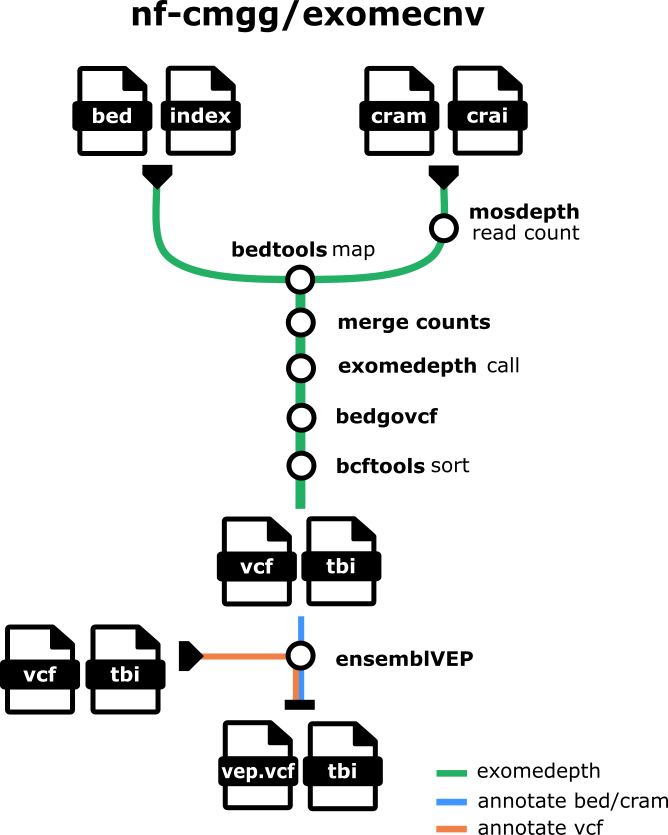
nf-cmgg/exomecnv is a bioinformatics pipeline that can be used to call copy number variations (CNVs) from exome sequencing data with ExomeDepth and annotate these with EnsemblVEP. It takes a samplesheet with mosdepth *per-base.bed.gz, *cram or *bam files and their index files as input, generates read count data in a region of interest bed file, calls CNVs and ends with an annotation. It is also possible to take a samplesheet with VCF files and their index files as input and only execute the annotation step.
Pipeline Summary
- Input samplesheet check
Mosdepthread counting per sample if CRAM/BAM files are provided- Extract mean coverage from the mosdepth per-base coverage
bedfiles for the ROI regions withbedtools map - Merge count files per batch
ExomeDepthCNV calling per sample- Convert ExomeDepth output files to VCF with
bedgovcf+ sort VCF withbcftools - Annotate VCF files with
EnsemblVEP
Usage
Note
If you are new to Nextflow and nf-core, please refer to this page on how to set-up Nextflow. Make sure to test your setup with -profile test before running the workflow on actual data.
First, prepare a samplesheet with your input data that looks as follows:
samplesheet.csv:
sample,batch,family,bed,bed_index,vcf,tbi
Sample1,prep_M,Fam1,/path/to/bed/Sample1.per-base.bed.gz,/path/to/bed_index/Sample1.per-base.bed.gz.csi
Sample2,prep_F,Fam2,/path/to/bed/Sample2.per-base.bed.gz,/path/to/bed_index/Sample2.per-base.bed.gz.csi,/path/to/Sample2.vcf,/path/to/Sample2.vcf.tbi
Each row represents a sample with the associated batch and family, followed by the paths to the BED/BED_INDEX, CRAM/CRAI or VCF/TBI files, depending on which tasks should be executed.
Now, you can run the pipeline using:
nextflow run nf-cmgg/exomecnv \
   -profile <docker/conda> \
   --input /path/to/samplesheet.csv \
   --outdir /path/to/outdir \
   --vep_cache /path/to/vep_cache \
   --exomedepth \
   --annotate
to execute the ExomeDepth workflow, followed by an EnsemblVEP annotation. The --annotate parameter is optional. If not provided, only the ExomeDepth workflow will be executed.
Warning
Please provide pipeline parameters via the CLI or Nextflow -params-file option. Custom config files including those provided by the -c Nextflow option can be used to provide any configuration except for parameters; see docs.
Credits
nf-cmgg/exomecnv was originally written by BertGalle and Toros.
We thank the following people for their extensive assistance in the development of this pipeline: nvnieuwk and matthdsm
Contributions and Support
If you would like to contribute to this pipeline, please see the contributing guidelines.
Development environment
A pixi development environment is available for this pipeline. Run the following command to install the environment:
pixi install
Then run pixi shell to enter the environment and start developing.
Citations
An extensive list of references for the tools used by the pipeline can be found in the CITATIONS.md file.
This pipeline uses code and infrastructure developed and maintained by the nf-core community, reused here under the MIT license.
The nf-core framework for community-curated bioinformatics pipelines.
Philip Ewels, Alexander Peltzer, Sven Fillinger, Harshil Patel, Johannes Alneberg, Andreas Wilm, Maxime Ulysse Garcia, Paolo Di Tommaso & Sven Nahnsen.
Nat Biotechnol. 2020 Feb 13. doi: 10.1038/s41587-020-0439-x.
VEP parameters#
Species
--vep_cache#
required
Path to the VEP cache
Genome
Cache version
Generic options#
Less common options for the pipeline, typically set in a config file.
Display the help message.
Display version and exit.
Display the full detailed help message.
Custom logo file to supply to MultiQC. File name must also be set in the MultiQC config file
Email address for completion summary, only when pipeline fails.
More detail
An email address to send a summary email to when the pipeline is completed - ONLY sent if the pipeline does not exit successfully.