nf-core/abotyper

















ABO blood typing using Oxford Nanopore MinION sequencing
nf-core/abotyper is a bioinformatics pipeline that analyses data obtained from Third Generation Sequencing of the Homo sapiens ABO, alpha 1-3-N-acetylgalactosaminyltransferase and alpha 1-3-galactosyltransferase (ABO) gene to deduce the ABO blood type.
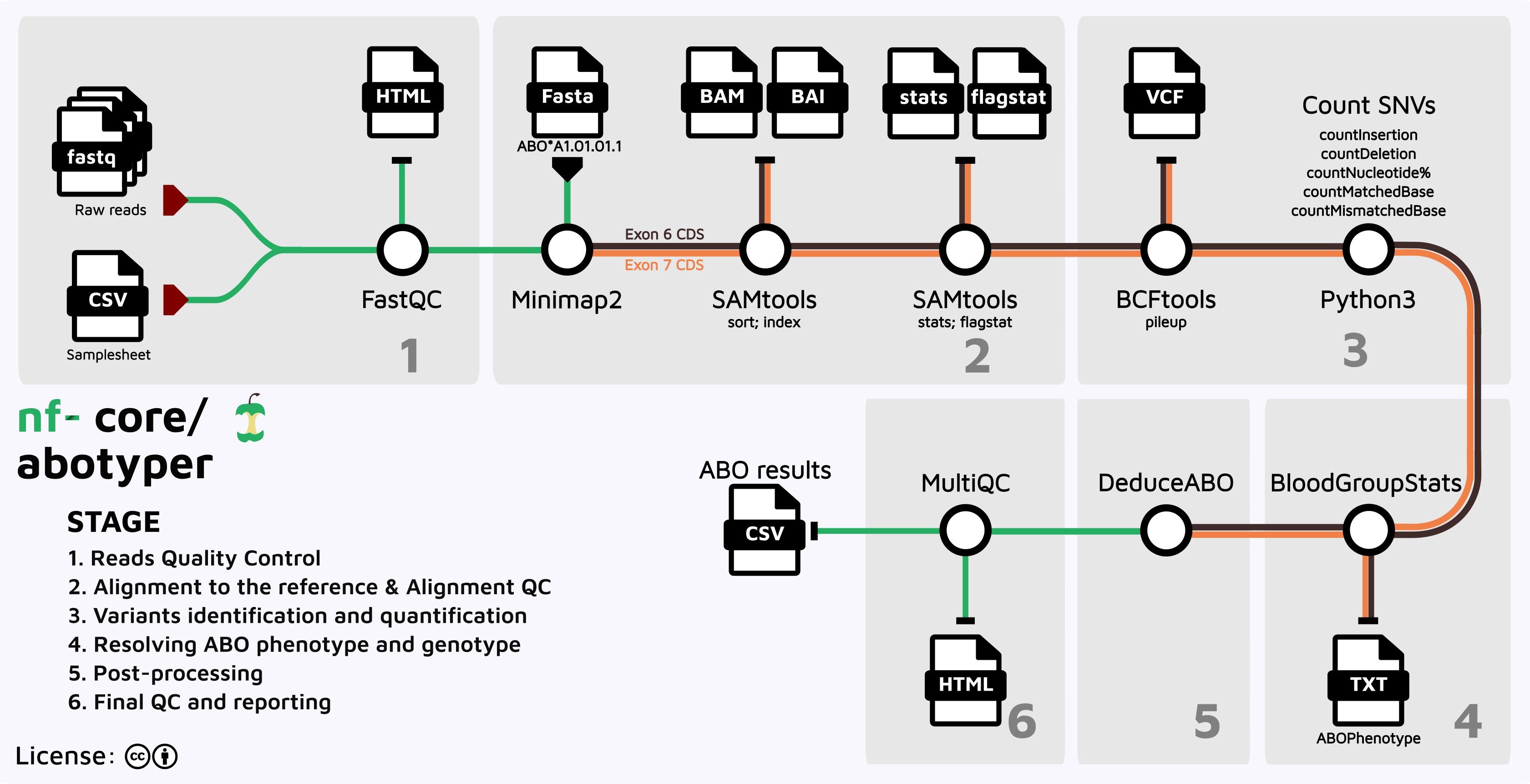
It takes a samplesheet and FASTQ files as input, performs quality control (QC), mapping to the reference sequences, variant characterisation, and finally deduce the Blood Group Statistics based on known ABO-related Single nucleotide variants (SVNs).
ABO sequences were acquired from the NCBI RefSeq and dbRBC databases:
- ABO RefSeqGene (NG_006669.2) - single combined reference used for alignment
- dbMHC and IHWG data
Pipeline steps
Note
If you are new to Nextflow and nf-core, please refer to this page on how to set-up Nextflow. Make sure to test your setup with -profile test before running the workflow on actual data.
- Read quality control - Quality assessment of input FASTQ files using FastQC (
FASTQC) - Read alignment - Align reads to a single combined ABO reference (NG_006669.2) using Minimap2 (
MINIMAP2_ALIGN) - Alignment statistics - Generate comprehensive alignment metrics including coverage, flagstat, and detailed statistics:
- Coverage analysis (
SAMTOOLS_COVERAGE) - Flagstat metrics (
SAMTOOLS_FLAGSTAT) - Detailed statistics (
SAMTOOLS_STATS)
- Coverage analysis (
- Variant calling - Call small variants (with phasing) directly from the aligned BAM using Clair3 (
CLAIR3) - Variant quantification - Convert Clair3's gVCF and phased VCF into per-position allele frequencies and per-read-equivalent haplotypes (
ABO_CLAIR2METRICS,ABO_CLAIR2HAPLOTYPES) - SNP extraction - Extract and analyze ABO-relevant single nucleotide variants using the panel-driven coordinate system (
ABO_GETABOSNPS) - Phenotype prediction - Predict ABO blood group phenotype from combined SNP and haplotype patterns (
ABO_SNPS2PHENO) - Quality control reporting - Compile comprehensive QC report with alignment and variant metrics (
MULTIQC)
The pipeline uses NG_006669.2 (RefSeqGene, LRG_792) as a single combined ABO reference. Variant marker positions and coordinate calibration are defined in assets/refs/abo_variant_panel.yaml (see bin/README.md for details).
Summary of tools and version used in the pipeline
The pipeline makes use of the following core dependencies:
| Dependency | Minimum version | Used for |
|---|---|---|
| Core Tools | ||
| fastqc | 0.12.1 | raw read quality control |
| minimap2 | 2.30 | long-read alignment |
| samtools | 1.23 | BAM sort, index, alignment QC |
| clair3 | 2.0.0 | variant calling, phasing |
| bcftools | 1.23.1 | VCF normalize, filter (QC export) |
| multiqc | 1.35 | aggregate QC report |
| Python Environment | ||
| python | 3.13.5 | runtime for bin/ scripts |
| pandas | 2.3.1 | tabular data handling |
| pyyaml | 6.0 | variant panel YAML parsing |
| xlsxwriter | 3.2.5 | final Excel report output |
bin/rename_samples.py is a standalone lab-export utility, not wired into any pipeline process — if you run it manually it needs its own pandas + numpy environment, separate from the above.
Required input files structure
Ensure that all input fastq files have a naming convention that matches this regular expression (regex)
## python regex for matching samples
pattern = r"^(IMM|INGS|NGS|[A-Z0-9]+)(-[0-9]+-[0-9]+)?_barcode\d+$"
The regex does the following:
^(IMM|INGS|NGS|[A-Z0-9]+)allows for files strating with the prefixes IMM, INGS, NGS, or any combination of lettersA-to-Zand digits0-to-9.(-[0-9]+-[0-9]+)?handles optional segments of digits separated by a dash(-)._barcode\d+$ensures the filename ends with_barcode followed by digits to denote barcode numbers.
There is a file handling logic in the code filename.split("_") that assumes the barcode is always the last part of the filename. The names are split into basename and barcode which are then used in later reporting.
Please Adjust this if necessary based on actual filename structure in your assays.
Here are a few examples of acceptable input file names:
NGSPOS_barcode13.fastq
NGSNEG_barcode12.fastq
INGSPOS_barcode01.fastq
INGSNEG_barcode96.fastq
BTGSPOS_barcode19.fastq
2025705_barcode14.fastq
IMM-45-44874_barcode25.fastq
Sample1-2024-12345_barcode22.fastq
Sequencing platform compatibility
This pipeline was originally developed to process amplicon sequencing data from Oxford Nanopore Technologies platforms where multiple samples are expected to be barcoded. The pipeline has been extensively validated using Oxford Nanopore MinION data targeting ABO exons 6 and 7, which are the primary regions containing clinically relevant polymorphisms for ABO blood group determination.
While we recommend using the above naming convention for optimal compatibility, the pipeline can also handle FASTQ files from other sequencing platforms including:
- PacBio (currently undergoing testing)
- Ion Torrent (currently undergoing testing)
- Illumina (currently undergoing testing)
The pipeline will attempt to extract the sample name and barcode from the filenames using standard genomic sequence naming conventions, but will fall back to a default barcode00 if filenames lack the expected barcode format. For non-Nanopore platforms, ensure your FASTQ files contain reads spanning the ABO exon 6 and exon 7 regions (within the combined NG_006669.2 reference) for accurate genotyping.
Running nf-core/abotyper
This pipeline has been extensively tested using conda, docker, and singularity profiles. Other containerisation methods are being improved,tested and documented. It is adisable to run a minimal test run to check your environment before submitting big jobs.
To run this pipeline, use:
# Quick test
nextflow run nf-core-abotyper/main.nf --outdir test_working -profile test,conda -resume

# Complete run
nextflow nf-core/abotyper \
  -resume \
  -profile <docker/singularity/.../institute> \
  --input samplesheet.csv \
  --outdir <OUTDIR>
Warning
Please provide pipeline parameters via the CLI or Nextflow -params-file option. Custom config files including those provided by the -c Nextflow option can be used to provide any configuration except for parameters; see docs.
The code by permits renaming of samples using a tab-delimited file with sequencingID and sampleName (see nextflow.config file under $params.renaming_file). This option is controlled by the parameter $params.skip_renaming and can be overridden via the commandline using option --skip_renaming true to skip the process.
Output
For each sample, the pipeline aligns reads once against a single combined ABO reference (NG_006669.2, spanning exons 2-7) and generates BAM files, BAM metrics, and per-position variant statistics.
The output directory generated by this Nextflow pipeline will look something like this:
OUTDIR/
├── ABO_results.log
├── ABO_result.txt
├── ABO_result.xlsx
├── final_export.csv
├── per_sample_processing
│   └── SAMPLE1_barcode01
│       └── combined
│           ├── ABOReadPolymorphisms.txt
│           ├── alignment
│           │   ├── SAMPLE1_barcode01.bam
│           │   ├── SAMPLE1_barcode01.bam.bai
│           │   ├── SAMPLE1_barcode01.coverage.txt
│           │   ├── SAMPLE1_barcode01.flagstat
│           │   └── SAMPLE1_barcode01.stats
│           ├── SAMPLE1_barcode01.ABOPhenotype.txt
│           ├── SAMPLE1_barcode01.AlignmentStatistics.tsv
│           ├── SAMPLE1_barcode01.Haplotypes.tsv
│           └── SAMPLE1_barcode01.log.txt
├── pipeline_info
│   ├── execution_report_DATETIME.html
│   ├── execution_timeline_DATETIME.html
│   ├── execution_trace_DATETIME.txt
│   ├── nf_core_pipeline_software_mqc_versions.yml
│   ├── params_DATETIME.json
│   └── pipeline_dag_DATETIME.html
└── qc-reports
    ├── fastqc
    │