nf-core/kmermaid
nf-core/kmermaid
Compare DNA/RNA/protein sequences on k-mer content.



Introduction
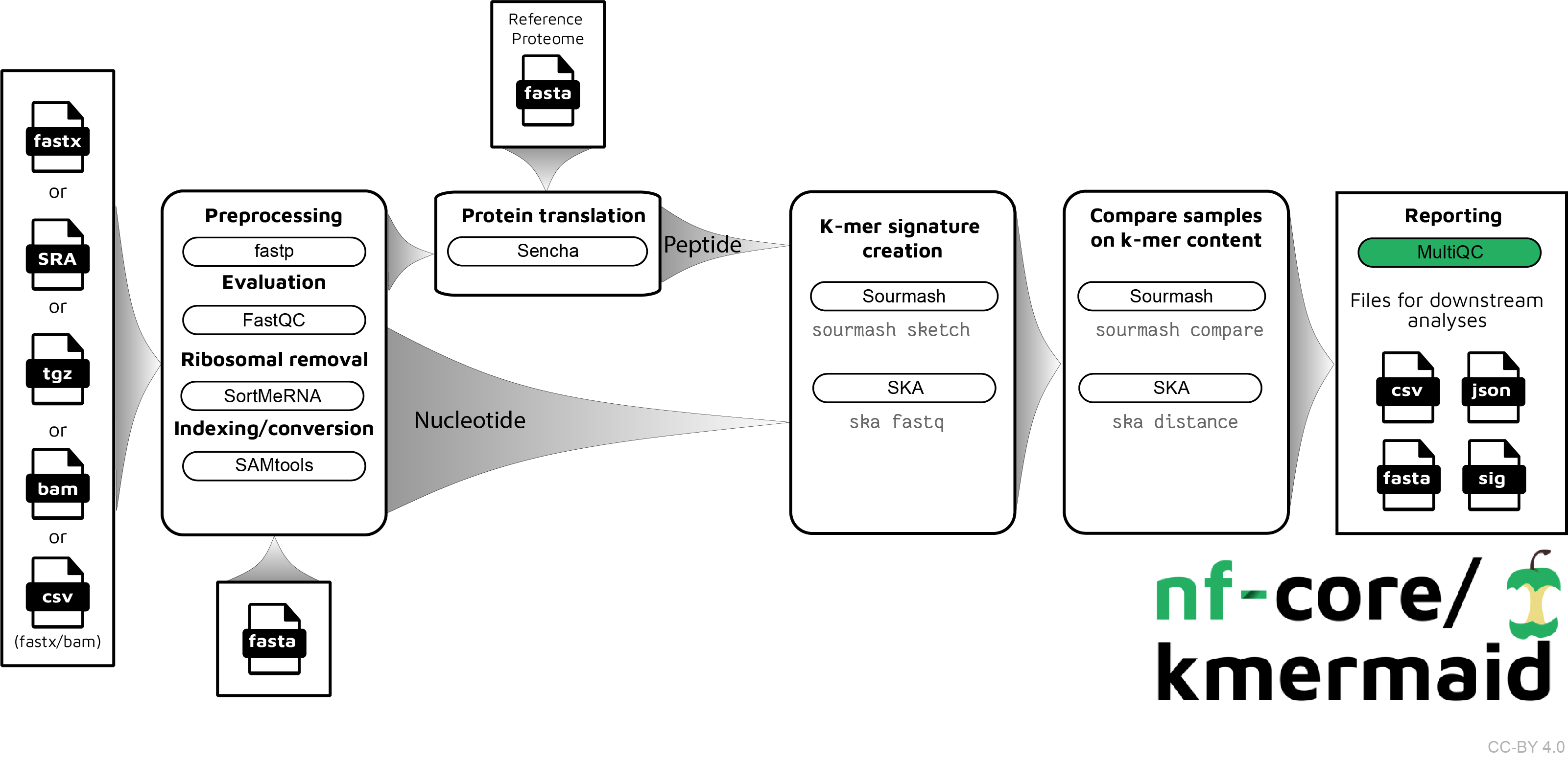
The pipeline is built using Nextflow, a workflow tool to run tasks across multiple compute infrastructures in a very portable manner. It comes with docker containers making installation trivial and results highly reproducible.
Quick Start
i. Install nextflow
ii. Install either Docker or Singularity for full pipeline reproducibility (please only use Conda as a last resort; see docs)
iii. Download the pipeline and test it on a minimal dataset with a single command
nextflow run nf-core/kmermaid -profile test,<docker/singularity/conda/institute>
Please check nf-core/configs to see if a custom config file to run nf-core pipelines already exists for your Institute. If so, you can simply use
-profile <institute>in your command. This will enable eitherdockerorsingularityand set the appropriate execution settings for your local compute environment.
iv. Start running your own analysis!
nextflow run nf-core/kmermaid -profile <docker/singularity/conda/institute> --reads '*_R{1,2}.fastq.gz' --genome GRCh37
See usage docs for all of the available options when running the pipeline.
Documentation
The nf-core/kmermaid pipeline comes with documentation about the pipeline, found in the docs/ directory:
- Installation
- Pipeline configuration
- Running the pipeline
- Output and how to interpret the results
- Troubleshooting
Usage
With a samples.csv file
nextflow run nf-core/kmermaid --outdir s3://olgabot-maca/nf-kmer-similarity/ --samples samples.csv
With R1, R2 read pairs
nextflow run nf-core/kmermaid --outdir s3://olgabot-maca/nf-kmer-similarity/ \
  --read_pairs 's3://olgabot-maca/sra/homo_sapiens/smartseq2_quartzseq/*{R1,R2}*.fastq.gz,s3://olgabot-maca/sra/danio_rerio/smart-seq/whole_kidney_marrow_prjna393431/*{1,2}.fastq.gz'
With SRA ids
nextflow run nf-core/kmermaid --outdir s3://olgabot-maca/nf-kmer-similarity/ --sra SRP016501
With fasta files
nextflow run nf-core/kmermaid --outdir s3://olgabot-maca/nf-kmer-similarity/ \
  --fastas '*.fasta'
With bam file
nextflow run czbiohub/nf-kmer-similarity --outdir s3://olgabot-maca/nf-kmer-similarity/ \
  --bam 'possorted_genome_bam.bam'
With split kmer
nextflow run czbiohub/nf-kmer-similarity --outdir s3://olgabot-maca/nf-kmer-similarity/ --samples samples.csv --split_kmer --subsample 1000
Credits
nf-core/kmermaid was originally written by Olga Botvinnik.
Contributions and Support
If you would like to contribute to this pipeline, please see the contributing guidelines.
For further information or help, don't hesitate to get in touch on Slack (you can join with this invite).
Citation
You can cite the nf-core publication as follows:
The nf-core framework for community-curated bioinformatics pipelines.
Philip Ewels, Alexander Peltzer, Sven Fillinger, Harshil Patel, Johannes Alneberg, Andreas Wilm, Maxime Ulysse Garcia, Paolo Di Tommaso & Sven Nahnsen.
Nat Biotechnol. 2020 Feb 13. doi: 10.1038/s41587-020-0439-x.
ReadCube: Full Access Link
bam options#
Options to adjust parameters and filtering criteria for read alignments.
10x sam tags
Number of alignment to contain in each sharded bam file
Path to single barcode save the fastas inside the output directory where the results will be saved.
For bam files, Optional absolute path to a .tsv barcodes file if the input is unfiltered 10x bam file
For bam files, Optional absolute path to a .tsv Tab-separated file mapping 10x barcode name to new name, e.g. with channel or cell annotation label
A barcode is only considered a valid barcode read and its signature is written if number of umis are greater than tenx_min_umi_per_cell
For bam files, Csv file name relative to outdir/barcode_metadata to write number of reads and number of umis per barcode. This csv file is empty with just header when the tenx_min_umi_per_cell is zero i.e Reads and umis per barcode are calculated only when the barcodes are filtered based on tenx_min_umi_per_cell
10x Cell pattern
10x UMI pattern
Generic options#
Less common options for the pipeline, typically set in a config file.
Display help text.
Workflow name.
More detail
A