nf-core/raredisease

















TOC
Introduction
nf-core/raredisease is a best-practice bioinformatic pipeline for calling and scoring variants from WGS/WES data from rare disease patients. This pipeline is heavily inspired by MIP.
Note
Right now, we only support paired-end data from Illumina. If you've got other types of data and the pipeline doesn't work for you, just open an issue. We'd be happy to chat about a solution.
The pipeline is built using Nextflow, a workflow tool to run tasks across multiple compute infrastructures in a very portable manner. It uses Docker/Singularity containers making installation trivial and results highly reproducible. The Nextflow DSL2 implementation of this pipeline uses one container per process which makes it much easier to maintain and update software dependencies. Where possible, these processes have been submitted to and installed from nf-core/modules in order to make them available to all nf-core pipelines, and to everyone within the Nextflow community!
On release, automated continuous integration tests run the pipeline on a full-sized dataset on the AWS cloud infrastructure. This ensures that the pipeline runs on AWS, has sensible resource allocation defaults set to run on real-world datasets, and permits the persistent storage of results to benchmark between pipeline releases and other analysis sources. The results obtained from the full-sized test can be viewed on the nf-core website.
Pipeline summary
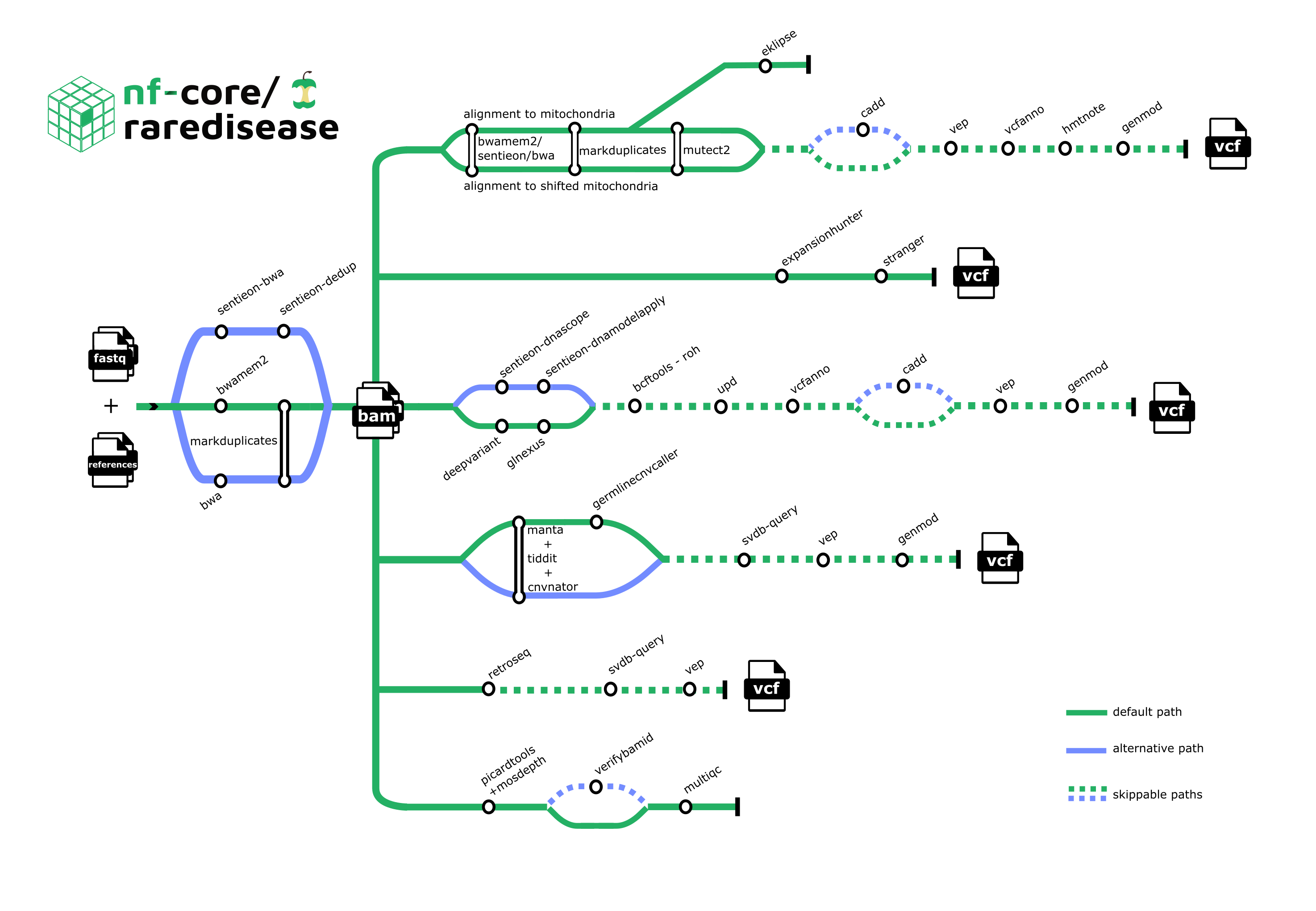
1. Preprocessing:
2. Alignment:
3. Metrics:
- FastQC
- Mosdepth
- MultiQC
- Picard's CollectMultipleMetrics, CollectHsMetrics, and CollectWgsMetrics
- Sambamba
- Sentieon's WgsMetricsAlgo
- TIDDIT's cov
- VerifyBamID2
4. Sex check:
5. Variant calling - SNV:
6. Variant calling - SV:
- Manta
- TIDDIT's sv
- Copy number variant calling:
- Mitochondrial SV calling:
7. Annotation - SNV:
8. Annotation - SV:
9. Mitochondrial analysis:
10. Variant calling - repeat expansions:
11. Variant calling - mobile elements:
12. Rank variants - SV and SNV:
13. Variant evaluation:
Note that it is possible to include/exclude certain tools or steps.
Usage
Note
If you are new to Nextflow and nf-core, please refer to this page on how to set-up Nextflow. Make sure to test your setup with -profile test before running the workflow on actual data.
First, prepare a samplesheet with your input data that looks as follows:
samplesheet.csv:
sample,lane,fastq_1,fastq_2,sex,phenotype,paternal_id,maternal_id,case_id
hugelymodelbat,1,reads_1.fastq.gz,reads_2.fastq.gz,1,2,,,justhusky
Each row represents a pair of fastq files (paired end).
Second, ensure that you have defined the path to reference files and parameters required for the type of analysis that you want to perform. More information about this can be found here.
Now, you can run the pipeline using:
nextflow run nf-core/raredisease \
   -profile <docker/singularity/podman/shifter/charliecloud/conda/institute> \
   --input samplesheet.csv \
   --outdir <OUTDIR>
Warning
Please provide pipeline parameters via the CLI or Nextflow -params-file option. Custom config files including those provided by the -c Nextflow option can be used to provide any configuration except for parameters; see docs.
For more details and further functionality, please refer to the