nf-core/bacmodel
















Introduction
nf-core/bacmodel is a bioinformatics pipeline for comprehensive functional annotation and metabolic modeling of bacterial genomes. The pipeline takes bacterial genome assemblies (FASTA format) and performs the following steps:
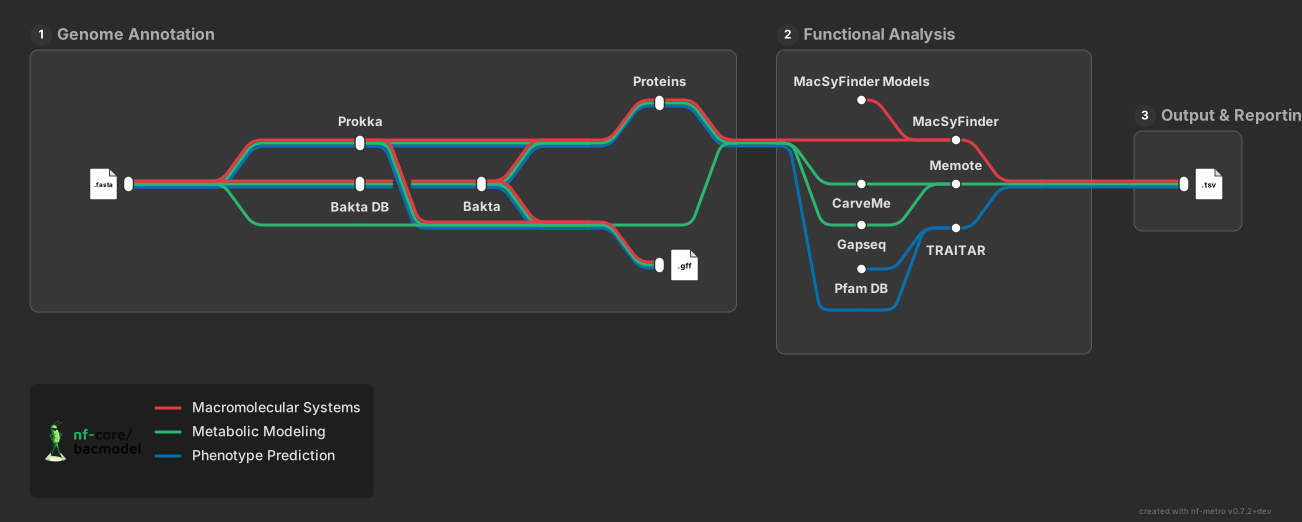
- Genome annotation with Prokka or Bakta
- Macromolecular system detection with MacSyFinder (optional)
- Phenotype prediction with Traitar (optional)
- Metabolic model reconstruction with CarveMe or gapseq (optional)
- Model quality evaluation with MEMOTE (optional)
Usage
Note
If you are new to Nextflow and nf-core, please refer to this page on how to set-up Nextflow. Make sure to test your setup with -profile test before running the workflow on actual data.
First, prepare a samplesheet with your input data that looks as follows. It can be comma-separated (.csv) or tab-separated (.tsv):
samplesheet.csv:
sample,fasta
sample1,/path/to/genome1.fasta
sample2,/path/to/genome2.fasta.gz
sample3,https://example.com/genome3.fasta.gz
Now, you can run the pipeline using:
nextflow run nf-core/bacmodel \
   -profile <docker/singularity/.../institute> \
   --input samplesheet.csv \
   --outdir <OUTDIR>
By default, the pipeline runs Prokka annotation. To use Bakta instead:
nextflow run nf-core/bacmodel \
   -profile <docker/singularity/.../institute> \
   --input samplesheet.csv \
   --annotation_tool bakta \
   --outdir <OUTDIR>
To enable optional functional analysis tools:
nextflow run nf-core/bacmodel \
   -profile <docker/singularity/.../institute> \
   --input samplesheet.csv \
   --skip_macsyfinder false \
   --skip_traitar false \
   --skip_carveme false \
   --skip_gapseq false \
   --skip_memote false \
   --outdir <OUTDIR>
Warning
Please provide pipeline parameters via the CLI or Nextflow -params-file option. Custom config files including those provided by the -c Nextflow option can be used to provide any configuration except for parameters; see docs.
For more details and further functionality, please refer to the usage documentation and the parameter documentation.
Pipeline output
To see the results of an example test run with a full size dataset refer to the results tab on the nf-core website pipeline page. For more details about the output files and reports, please refer to the output documentation.
Credits
nf-core/bacmodel was originally written by Olga Brovkina at the Institute of Clinical Molecular Biology (IKMB), Kiel University.
We thank the following people for their extensive assistance in the development of this pipeline:
- The nf-core community for providing excellent tools and modules
- The developers of Prokka, Bakta, MacSyFinder, Traitar, and CarveMe for their excellent software
Contributions and Support
If you would like to contribute to this pipeline, please see the contributing guidelines.
For further information or help, don't hesitate to get in touch on the Slack #bacmodel channel (you can join with this invite).
Citations
If you use nf-core/bacmodel for your analysis, please cite the pipeline along with the tools it uses. A full list of references for the tools and data used by the pipeline can be found in the CITATIONS.md file.
You can cite the nf-core publication as follows:
The nf-core framework for community-curated bioinformatics pipelines.
Philip Ewels, Alexander Peltzer, Sven Fillinger, Harshil Patel, Johannes Alneberg, Andreas Wilm, Maxime Ulysse Garcia, Paolo Di Tommaso & Sven Nahnsen.
Nat Biotechnol. 2020 Feb 13. doi: 10.1038/s41587-020-0439-x.
Generic options#
Less common options for the pipeline, typically set in a config file.
Display the help message.
Display version and exit.
Display the full detailed help message.
Email address for completion summary, only when pipeline fails.
More detail
An email address to send a summary email to when the pipeline is completed - ONLY sent if the pipeline does not exit successfully.
Do not use coloured log outputs.