nf-cmgg/preprocessing
nf-cmgg/preprocessing







Introduction
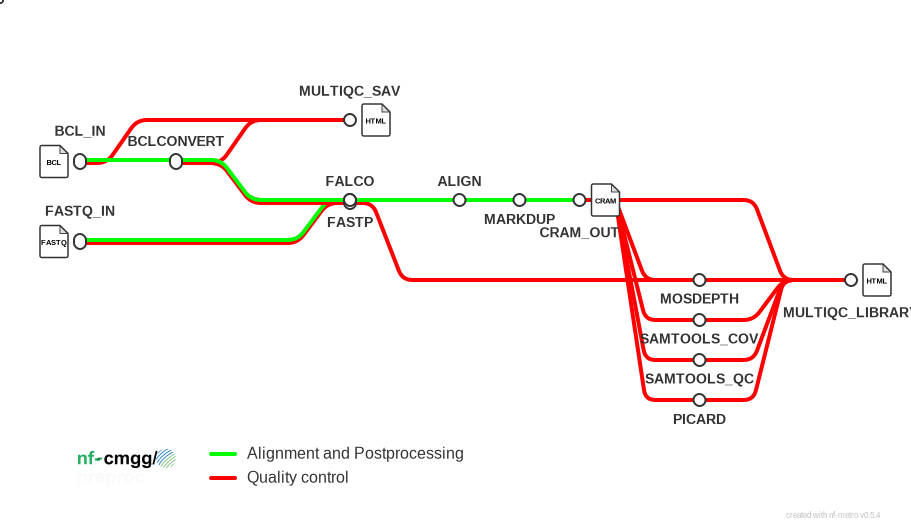
nf-cmgg/preprocessing is a bioinformatics pipeline that demultiplexes and aligns raw sequencing data. It also performs basic QC and coverage analysis.
The pipeline is built using Nextflow, a workflow tool to run tasks across multiple compute infrastructures in a very portable manner. It comes with docker containers making installation trivial and results highly reproducible.
Steps include:
- Demultiplexing using
BCLconvert - Run QC using
MultiQC SAV - Read QC and trimming using
fastporfalco - Alignment using either
bwa,bwa-mem2,bowtie2,dragmap,snaporstrobefor DNA-seq andSTARfor RNA-seq - Duplicate marking using
bamsormaduporsamtools markdup - Coverage analysis using
mosdepthandsamtools coverage - Alignment QC using
samtools flagstat,samtools stats,samtools idxstatsandpicard CollectHsMetrics,picard CollectWgsMetrics,picard CollectMultipleMetrics - QC aggregation using
multiqc
Usage
Note
If you are new to Nextflow and nf-core, please refer to this page on how to set-up Nextflow. Make sure to test your setup with -profile test before running the workflow on actual data.
The full documentation can be found here
First, prepare a samplesheet with your input data. Check the usage docs for details on the required format and example files.
Now, you can run the pipeline using:
nextflow run nf-cmgg/preprocessing \
   -profile <docker/singularity/...> \
   --igenomes_base /path/to/genomes \
   --input samplesheet.<csv|yaml|json> \
   --outdir <OUTDIR>
Warning
Please provide pipeline parameters via the CLI or Nextflow -params-file option. Custom config files including those provided by the -c Nextflow option can be used to provide any configuration except for parameters; see docs.
Development environment
A pixi development environment is available for this pipeline. Run the following command to install the environment:
pixi install
Then run pixi shell to enter the environment and start developing.
Credits
nf-cmgg/preprocessing was originally written by the CMGG ICT team.
Support
This pipeline uses code and infrastructure developed and maintained by the nf-core community, reused here under the MIT license.
The nf-core framework for community-curated bioinformatics pipelines.
Philip Ewels, Alexander Peltzer, Sven Fillinger, Harshil Patel, Johannes Alneberg, Andreas Wilm, Maxime Ulysse Garcia, Paolo Di Tommaso & Sven Nahnsen.
Nat Biotechnol. 2020 Feb 13. doi: 10.1038/s41587-020-0439-x.
Generic options#
Less common options for the pipeline, typically set in a config file.
Display the help message.
Name of iGenomes reference.
More detail
If using a reference genome configured in the pipeline using iGenomes, use this parameter to give the ID for the reference. This is then used to build the full paths for all required reference genome files e.g. --genome GRCh38.
See the nf-core website docs for more details.
Display version and exit.
Incoming hook URL for messaging service
More detail
Incoming hook URL for messaging service. Currently, MS Teams and Slack are supported.
Display the full detailed help message.
Custom logo file to supply to MultiQC. File name must also be set in the MultiQC config file
Email address for completion summary, only when pipeline fails.