nf-core/proteogenomicsdb

The ProteoGenomics database generation workflow (pgdb) use the pypgatk and nextflow to create different protein databases for ProteoGenomics data analysis.






Introduction
nf-core/pgdb is a bioinformatics pipeline to generate proteogenomics databases. pgdb allows users to create proteogenomics databases using EMSEMBL as the reference proteome database. Three different major databases can be attached to the final proteogenomics database:
- The reference proteome (ENSEMBL Reference proteome)
- Non canonical proteins: pseudo-genes, sORFs, lncRNA.
- Variants: COSMIC, cBioPortal, GENOMAD variants
The pipeline allows to estimate decoy proteins with different methods and attach them to the final proteogenomics database.
The pipeline is built using Nextflow, a workflow tool to run tasks across multiple compute infrastructures in a very portable manner. It comes with docker containers making installation trivial and results highly reproducible.
Quick Start
-
Install
nextflow -
Install any of
Docker,Singularity,Podman,ShifterorCharliecloudfor full pipeline reproducibility (please only useCondaas a last resort; see docs) -
Download the pipeline and test it on a minimal dataset with a single command (This run will download the canonical ENSEMBL reference proteome and create proteomics database with it):
nextflow run nf-core/pgdb -profile test,<docker/singularity/podman/shifter/charliecloud/conda/institute>Please check nf-core/configs to see if a custom config file to run nf-core pipelines already exists for your Institute. If so, you can simply use
-profile <institute>in your command. This will enable eitherdockerorsingularityand set the appropriate execution settings for your local compute environment. -
Start running your own analysis!
nextflow run nf-core/pgdb -profile <docker/singularity/podman/conda/institute> --ncrna true --pseudogenes true --altorfs trueThis will create a proteogenomics database with the ENSEMBL reference proteome and non canonical proteins like pseudo genes, non coding rnas or alternative open reading frames.
See usage docs for all of the available options when running the pipeline.
Pipeline Summary
By default, the pipeline currently performs the following:
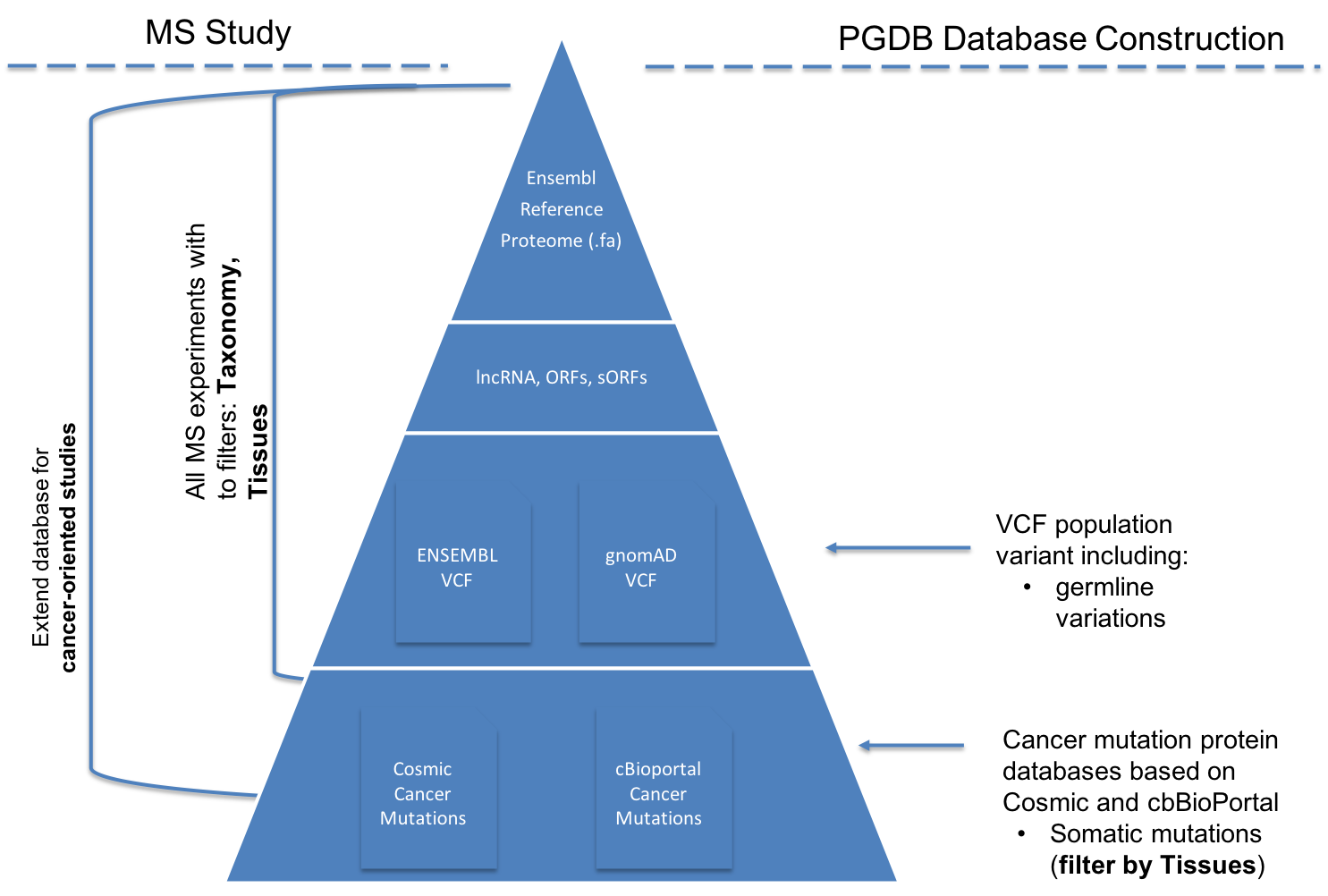
- Download protein databases from ENSEMBL
- Translate from Genomics Variant databases into ProteoGenomics Databases (
COSMIC,GNOMAD) - Add to a Reference proteomics database, non-coding RNAs + pseudogenes.
- Compute Decoy for a proteogenomics databases
Documentation
The nf-core/pgdb pipeline comes with documentation about the pipeline: usage and output.
Credits
nf-core/pgdb was originally written by Husen M. Umer (EMBL-EBI) & Yasset Perez-Riverol (Karolinska Institute)
Contributions and Support
If you would like to contribute to this pipeline, please see the contributing guidelines.
For further information or help, don't hesitate to get in touch on the Slack #pgdb channel (you can join with this invite).
Citations
You can cite the nf-core publication as follows:
The nf-core framework for community-curated bioinformatics pipelines.
Philip Ewels, Alexander Peltzer, Sven Fillinger, Harshil Patel, Johannes Alneberg, Andreas Wilm, Maxime Ulysse Garcia, Paolo Di Tommaso & Sven Nahnsen.
Nat Biotechnol. 2020 Feb 13. doi: 10.1038/s41587-020-0439-x.
An extensive list of references for the tools used by the pipeline can be found in the CITATIONS.md file.
Generic options#
Less common options for the pipeline, typically set in a config file.
Display help text.
Directory to keep pipeline Nextflow logs and reports.
Email address for completion summary, only when pipeline fails.
More detail
This works exactly as with --email, except emails are only sent if the workflow is not successful.
Do not use coloured log outputs.
More detail
Set to disable colourful command line output and live life in monochrome.
Send plain-text email instead of HTML.
More detail
Set to receive plain-text e-mails instead of HTML formatted.
Boolean whether to validate parameters against the schema at runtime
Method used to save pipeline results to output directory.
More detail
The Nextflow publishDir option specifies which intermediate files should be saved to the output directory. This option tells the pipeline what method should be used to move these files. See Nextflow docs for details.